


XML Sitemaps: Why They Matter and How to Use Them
Introduction
In the world of SEO, making sure search engines can efficiently crawl and index your website is crucial. One of the most important tools to help achieve this is an XML sitemap.
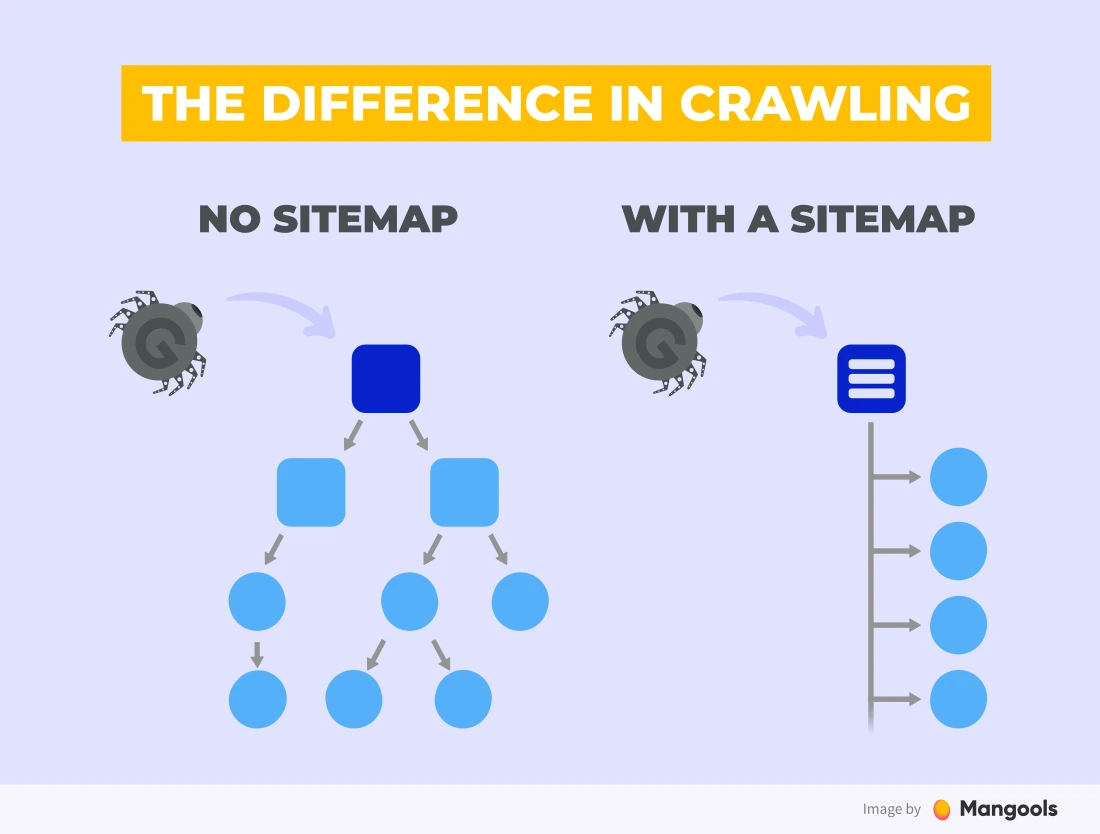
An XML sitemap acts as a roadmap for search engines, providing information about all the important pages on your website and helping them understand the site structure. Properly implementing and maintaining a sitemap can improve crawl efficiency, ensure critical content is indexed, and indirectly boost your rankings.
In this guide, we’ll explain what XML sitemaps are, why they matter, and how to create and use them effectively.
1. What is an XML Sitemap?
An XML sitemap is a machine-readable file that lists all the pages on your website. Unlike HTML sitemaps designed for humans, XML sitemaps are specifically for search engines.
Key Features of XML Sitemaps:
- Lists all important URLs on your site.
- Provides metadata for each page, such as last modified date, priority, and update frequency.
- Helps search engines discover new or updated content quickly.
💡 Tip: An XML sitemap doesn’t guarantee indexing, but it increases the chances that your content will be crawled efficiently.
2. Why XML Sitemaps Matter for SEO
XML sitemaps are critical for several reasons:
- Improved Crawl Efficiency
Search engines use sitemaps to understand your site structure and prioritize which pages to crawl first, especially for large websites. - Faster Indexing of New Content
New or recently updated pages are more quickly discovered and indexed when included in a sitemap. - Highlighting Important Pages
You can indicate which pages are most important using the “priority” attribute, helping search engines focus on high-value content. - Error Identification
Sitemaps combined with Google Search Console can reveal crawl errors or indexing issues, allowing you to fix problems proactively. - Support for Complex Websites
Websites with dynamic content, large archives, or poor internal linking benefit most from XML sitemaps, ensuring no page gets overlooked.
3. Types of XML Sitemaps
There are several types of XML sitemaps depending on your content and website structure:
- Standard URL Sitemap: Lists all main pages of a website.
- Video Sitemap: Provides metadata about video content, including duration and thumbnail.
- Image Sitemap: Helps search engines find images, especially for image-heavy sites.
- News Sitemap: Required for Google News to highlight recent news content.
- Mobile Sitemap: Ensures mobile-friendly pages are crawled and indexed efficiently.
💡 Tip: You can combine multiple sitemaps into a Sitemap Index file if your website is large or has various content types.
4. How to Create an XML Sitemap
Step 1: Use a Sitemap Generator
- For WordPress sites: Plugins like Yoast SEO or RankMath can automatically generate sitemaps.
- For other websites: Tools like XML-Sitemaps.com or Screaming Frog can generate sitemaps quickly.
Step 2: Include Important Pages
- Add only canonical URLs to avoid duplicates.
- Exclude low-value pages like admin pages, login pages, or tag pages.
Step 3: Add Metadata
- lastmod: Last modified date of the page.
- changefreq: How often the page is likely to change (daily, weekly, monthly).
- priority: Importance of the page relative to other pages (0.0 to 1.0).
Step 4: Validate Your Sitemap
- Use tools like Google Search Console Sitemap Report or XML Sitemap Validator to check for errors.
5. How to Submit an XML Sitemap to Google
Submitting your sitemap ensures Google can crawl your website efficiently.
- Log in to Google Search Console.
- Navigate to Sitemaps under the “Index” section.
- Enter the URL of your sitemap (e.g.,
https://www.example.com/sitemap.xml). - Click Submit.
- Monitor the status for errors or indexing issues.
💡 Tip: Submitting a sitemap doesn’t guarantee immediate indexing but helps Google prioritize crawling your pages.
6. Best Practices for XML Sitemaps
- Keep it Updated: Ensure new content is added to the sitemap automatically or updated regularly.
- Use Canonical URLs: Avoid duplicate content by listing only canonical URLs.
- Limit Sitemap Size: Each sitemap should ideally have 50,000 URLs or less; use multiple sitemaps if necessary.
- Prioritize Pages: Assign higher priority to pages that matter most for SEO.
- Monitor via Search Console: Check for errors, warnings, and indexing status regularly.
- Include Only High-Quality Pages: Avoid adding thin or low-value pages that may hurt your SEO performance.
7. Common Mistakes to Avoid
- Submitting a sitemap with broken or redirected URLs.
- Including duplicate or non-canonical pages.
- Ignoring errors reported in Google Search Console.
- Forgetting to update the sitemap after adding or removing pages.
- Using an incorrect file format (must be XML, not HTML or TXT for search engines).
Avoiding these mistakes ensures that your sitemap is effective and helps search engines index your content efficiently.
8. Advanced Tips
- Dynamic Sitemaps for Large Sites: For websites with thousands of pages, use dynamically generated sitemaps to keep them updated in real-time.
- Use Sitemap Index Files: Combine multiple sitemaps (images, videos, pages) into one index for better organization.
- Integrate with Robots.txt: Include the sitemap URL in your
robots.txtfile to guide search engine crawlers. - Track Sitemap Performance: Analyze how many URLs are indexed versus submitted to identify content issues.
FAQs
1. Can XML sitemaps include only certain sections of a website?
Yes, you can create sitemaps for specific sections, such as blog posts, product pages, or service pages. This allows search engines to prioritize crawling high-value content first.
2. How does a sitemap affect crawling of dynamically generated pages?
For dynamic websites, sitemaps highlight all possible URL variations to search engines, ensuring pages generated via scripts or filters are discovered and indexed properly.
3. Are there SEO benefits to submitting a sitemap to Bing or other search engines?
Yes, submitting a sitemap to Bing Webmaster Tools or other search engines improves crawl efficiency and ensures that your content is discovered beyond Google, boosting overall visibility.
4. Can sitemaps help identify duplicate content issues?
Indirectly. By monitoring which URLs are indexed from your sitemap, you can spot duplicate or near-duplicate pages and take corrective action to improve SEO performance.
5. Is it necessary to include every single page in a sitemap?
No, only valuable and indexable pages should be included. Excluding thin content, admin pages, or duplicate pages helps search engines focus on your most important content.
6. Can XML sitemaps help with multilingual or multi-regional websites?
Yes. Sitemaps can include hreflang tags to indicate language or regional versions, helping search engines serve the correct content to the right audience.
7. How do search engines use the “lastmod” attribute in sitemaps?
The “lastmod” attribute signals when a page was last updated, helping search engines decide which pages may need frequent crawling to capture fresh content.
8. Can XML sitemaps improve indexing speed for new website launches?
Yes. For new websites with few backlinks, submitting an XML sitemap ensures search engines discover and index pages faster, speeding up visibility in search results.
9. Should XML sitemaps include URLs with query parameters?
It depends. Only include important URLs with query parameters that lead to unique content. Avoid URLs that generate duplicate or thin content.
10. Can XML sitemaps help with content migration or website redesigns?
Yes. Sitemaps help search engines understand the new site structure, making it easier to index pages after migration and minimizing the risk of losing traffic.
Conclusion
An XML sitemap is a foundational SEO tool that ensures search engines can crawl, index, and understand your website efficiently. It’s especially crucial for large websites, dynamic content, or newly launched sites.
By creating, submitting, and maintaining an XML sitemap, you can improve your site’s visibility in search results, ensure important pages are indexed quickly, and identify potential issues that could hurt your rankings.
Whether you’re a beginner or an experienced marketer, implementing and optimizing XML sitemaps should be a priority in your SEO strategy.


